


 Muhammad Saad

 Summarize in ChatGPT
Robots.txt is a plain-text file that tells automated crawlers which URLs or sections of a website they are allowed or disallowed to crawl. The file uses the Robots Exclusion Protocol (REP), originally created in 1994 and standardized as RFC 9309 in 2022. A robots.txt file normally contains User-agent, Disallow and Allow rules and can also reference XML sitemaps.
It is mainly used to control crawler access, reduce unnecessary crawling and manage search, commercial and AI bots, but it is not a security system and is not the correct method for reliably removing webpages from Google’s index. Robots.txt differs from the robots meta tag and X-Robots-Tag because robots.txt controls whether a crawler can fetch a URL, while page-level robots directives control indexing and search-result presentation after crawling.
In 2026, robots.txt also matters to AI search because Google, OpenAI, Anthropic and other crawler operators expose bot-specific controls through robots.txt, while llms.txt serves a different purpose by providing AI systems a curated map of website information.
What Is Robots.txt?
Robots.txt is a UTF-8 plain-text file placed at the root of a website to tell compliant automated crawlers which URL paths they can and cannot access.
For example:
User-agent: *
Disallow: /search/
This rule tells crawlers covered by User-agent: * not to crawl URLs beginning with /search/.
The file must normally exist at:
https://example.com/robots.txt
and not:
https://example.com/folder/robots.txt
RFC 9309 requires the file to be named /robots.txt at the top-level path of the service. Google also states that robots.txt rules apply only to the exact host, protocol and port where that robots.txt file is located. Therefore, rules on https://example.com/robots.txt do not automatically control a separate subdomain such as https://shop.example.com/.
The basic robots.txt structure is:
User-agent: crawler-name
Disallow: /blocked-path/
Allow: /allowed-path/
User-agent identifies the crawler.
Disallow identifies a URL path the crawler should not request.
Allow identifies a URL path that can be requested, commonly as an exception inside a broader blocked path.
What Are The Best Examples Of Robots.txt?
The best examples of robots.txt are configurations that solve real crawling problems without accidentally blocking valuable webpages or resources.
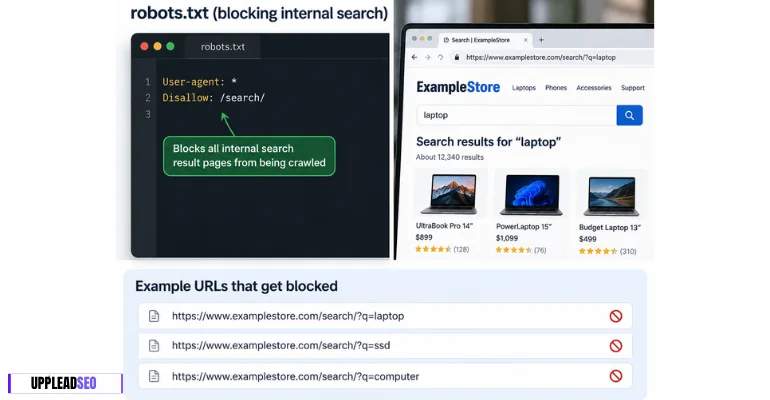
Blocking Internal Search Results
Internal search result pages can generate thousands or millions of low-value URL combinations.
User-agent: *
Disallow: /search/
For example:
/search/?q=laptop
/search/?q=ssd
/search/?q=computer
Google has specifically recommended controlling problematic dynamic URLs such as search results, calendars and infinite URL spaces when they create unnecessary crawling.
Blocking Shopping Cart And Checkout Paths
An ecommerce website normally does not need search crawlers repeatedly requesting cart and checkout pages.
User-agent: *
Disallow: /cart/
Disallow: /checkout/
Disallow: /my-account/
Google itself uses /cart as an example of content that may reasonably be excluded from automated crawling.
Blocking Filter And Sorting URLs
Faceted navigation can create many URL combinations from one product category.
For example:
User-agent: Googlebot
Disallow: /*?sort=
Disallow: /*?filter=
A store may otherwise generate URLs such as:
/laptops/?sort=price
/laptops/?sort=rating
/laptops/?filter=brand-a
/laptops/?filter=brand-b
Google identifies faceted navigation, sorting functions and infinite URL spaces as possible sources of inefficient crawling.
Allowing One Important Path Inside A Blocked Directory
A website can block a directory while creating a more specific exception.
User-agent: Googlebot
Disallow: /assets/
Allow: /assets/important-rendering.js
The more specific matching rule is used.
Under RFC 9309, when Allow and Disallow rules match a URL, the crawler chooses the most specific match based on matching path length. When equally specific Allow and Disallow rules conflict, Allow should win.
Controlling AI Training Separately From Search
A website can allow traditional search crawling while expressing different preferences for some AI uses.
For Google’s Gemini-related control:
User-agent: Google-Extended
Disallow: /
Google states that Google-Extended controls whether crawled website content may be used for training future Gemini models and certain Gemini grounding uses. Blocking Google-Extended does not remove a website from Google Search and is not used as a Google Search ranking signal.
OpenAI also separates search discovery and potential training controls. Its current publisher documentation identifies OAI-SearchBot for ChatGPT search visibility and GPTBot for potential training-related crawling.
This separation is becoming increasingly important because:
Search crawling ≠ AI training crawling ≠ user-triggered retrieval
Providing Sitemap Locations
A robots.txt file can also tell crawlers where sitemaps are located.
User-agent: *
Disallow: /search/

Sitemap: https://example.com/sitemap.xml
Sitemap: https://example.com/products-sitemap.xml
How Does A Robots.txt File Work?
A robots.txt file works when a crawler first requests the website’s /robots.txt file, identifies the rule group matching its user-agent, compares the requested URL against the Allow and Disallow paths and then decides whether the URL may be fetched.
The basic process is:
Crawler Discovers URL → Requests robots.txt → Finds User-agent Group → Matches URL Rules → Crawl Allowed Or Blocked
For example:
User-agent: Googlebot
Disallow: /private-reports/
Googlebot wants to request:
https://example.com/private-reports/report-1/
The process becomes:
Googlebot → Read robots.txt → Match Googlebot → Match /private-reports/ → Do Not Crawl
Google’s documentation states that its automated crawlers download and parse robots.txt before crawling a site.
What Are The Common Methods Of Robots.txt?
The common methods of robots.txt are crawler-wide control, crawler-specific control, path-level exclusion, pattern matching, exception rules and sitemap declaration.
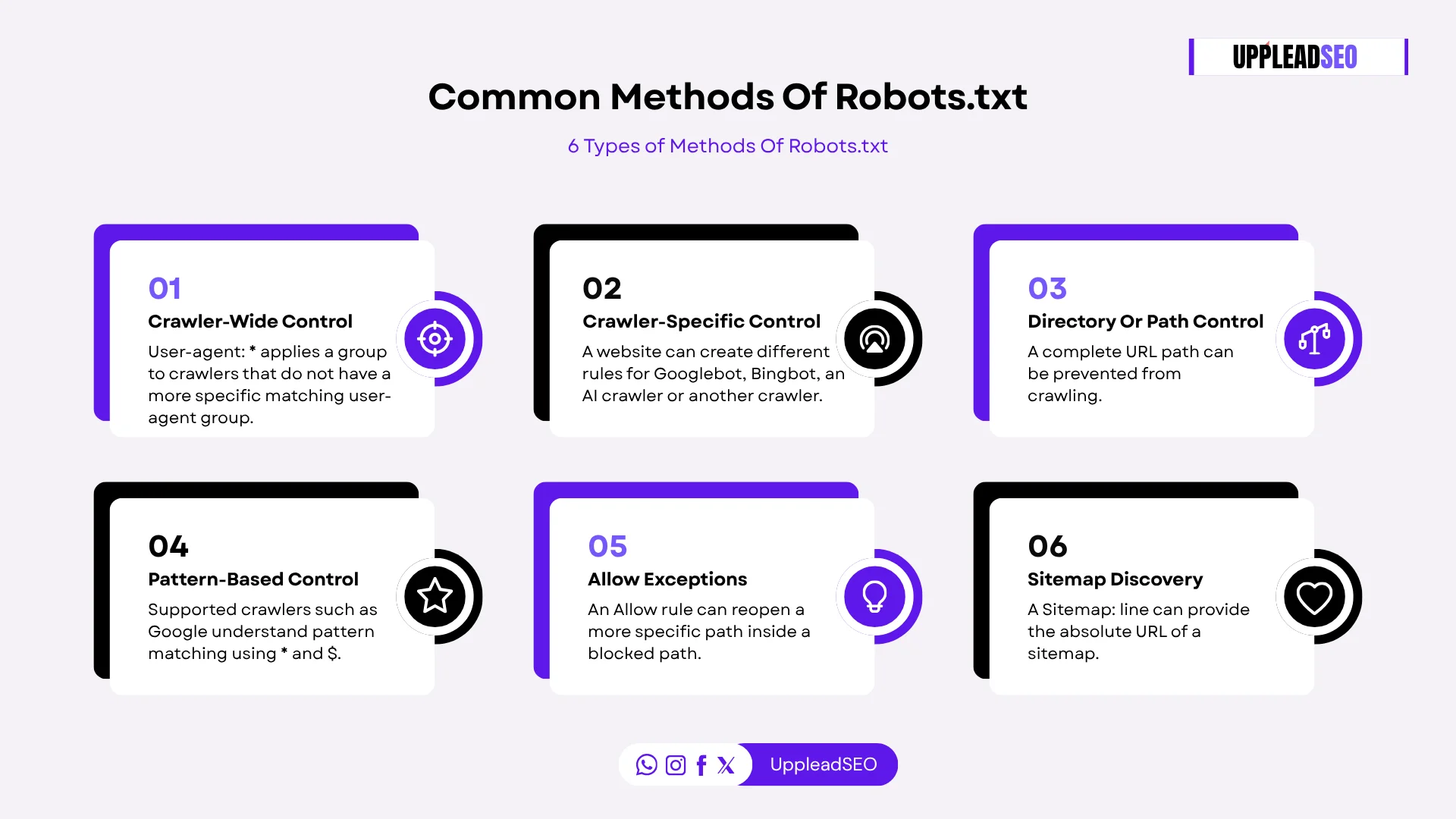
These are practical implementation methods rather than official REP classification names.
Crawler-Wide Control:
User-agent: * applies a group to crawlers that do not have a more specific matching user-agent group.
Crawler-Specific Control:
A website can create different rules for Googlebot, Bingbot, an AI crawler or another crawler.
User-agent: Googlebot
Disallow: /example/
Directory Or Path Control:
A complete URL path can be prevented from crawling.
Disallow: /internal-search/
Pattern-Based Control:
Supported crawlers such as Google understand pattern matching using * and $.
For example:
Disallow: /*.pdf$
This can match URLs ending in .pdf.
Allow Exceptions:
An Allow rule can reopen a more specific path inside a blocked path.
Disallow: /files/
Allow: /files/public/
Sitemap Discovery:
A Sitemap: line can provide the absolute URL of a sitemap.
Sitemap: https://example.com/sitemap.xml
What Is The History Of Robots.txt?
The history of robots.txt started in 1994, when webmaster Martijn Koster developed the original Robots Exclusion Protocol after automated crawlers were placing excessive load on his website.
Google’s historical documentation states that the protocol was created after crawlers overwhelmed Koster’s site. Other webmasters contributed, and search engines gradually adopted the protocol as a way for website owners to control automated access and protect server resources.
The timeline is:
- 1991: HTML appeared.
- 1992: Early web browsers appeared.
- 1994: Robots Exclusion Protocol and robots.txt were introduced.
- 1996: Robots meta tags appeared as page-level crawler instructions.
- 1998: Google was founded.
- 2007: Major search engines announced support for the Sitemap: directive in robots.txt.
- 2019: Google and other participants began formalizing REP through the IETF, and Google open-sourced the robots.txt parser used by its production systems.
- September 2022: Robots Exclusion Protocol became the Internet Standards Track specification RFC 9309.
- 2025–2026: robots.txt continued expanding in practical importance as crawler operators exposed separate controls for search bots, AI training bots, AI retrieval systems and other automated clients.
What Protocols Are Used In A Robots.txt File?
The main protocol used by robots.txt is the Robots Exclusion Protocol (REP) defined by RFC 9309.
There are 3 different protocol concepts:
- Robots Exclusion Protocol:
Defines how user agents and Allow/Disallow rules are interpreted. - HTTP/HTTPS Transfer:
The crawler normally retrieves /robots.txt through HTTP or HTTPS. Google also supports FTP robots.txt retrieval for relevant crawling environments. - Sitemaps Protocol:
The Sitemap: field refers crawlers to a sitemap. Sitemaps are a separate protocol, not a core robots.txt rule defined by RFC 9309. RFC 9309 explicitly notes that crawlers may interpret additional records such as Sitemap. Google, Bing and other major search engines support it.
Why Is Robots.txt Important?
Robots.txt is important because it gives website owners machine-readable control over how compliant crawlers spend requests across a website.
Its importance is strongest on websites containing large numbers of URLs.
For example, an ecommerce website can generate:
- 100,000 product URLs
- 50,000 filter URLs
- 30,000 sorting URLs
- 20,000 internal search URLs
If crawlers continuously request all 200,000 URLs, server resources and crawler attention can be spent on URLs that provide little search value.
A robots.txt file can reduce unnecessary requests to selected URL patterns.
How Does Robots.txt Relate To Bot Management?
Robots.txt relates to bot management by providing a public preference layer that tells compliant bots which website areas they should or should not crawl.
Bot management is broader than robots.txt.
A complete bot-management system can contain:
- Robots.txt
- User-agent identification
- IP verification
- Rate limiting
- Web Application Firewall rules
- CAPTCHA or challenge systems
- Authentication
- CDN bot controls
- Server logs
- Request blocking
Robots.txt handles the cooperative crawler part.
For example:
User-agent: ExampleBot
Disallow: /private-data/
A compliant ExampleBot reads this instruction and avoids that path.
A malicious bot can ignore it.
What Other Commands Are Part Of The Robots Exclusion Protocol?
The core robots.txt commands defined by the standardized Robots Exclusion Protocol are User-agent, Allow and Disallow.
User-agent
User-agent: Googlebot
Defines which crawler the following rules apply to.
Allow
Allow: /search/help/
Defines a path that may be crawled, commonly as a more specific exception to a broader Disallow.
Robots.txt also uses useful syntax elements:
- = wildcard matching zero or more characters for crawlers that support it.
- $ = end-of-URL match in Google’s implementation.
- = comment.
One command that should not be assumed to work with Google is:
Crawl-delay: 10
Google explicitly states that its crawlers do not process the non-standard crawl-delay robots.txt rule.
Disallow
Disallow: /search/
Defines a path that the selected crawler should not request.
What Is The Difference Between Robots.txt, Meta Robots Tag And X-Robots-Tag?
The difference between robots.txt, the robots meta tag and X-Robots-Tag is where the instruction exists and what it controls. Robots.txt primarily controls whether a crawler may request a URL. A robots meta tag provides indexing and search-serving instructions inside an HTML page. X-Robots-Tag provides similar page or resource-level instructions through the HTTP response header and can therefore work with non-HTML files such as PDFs and images.
| Feature | Robots.txt | Meta Robots Tag | X-Robots-Tag |
|---|---|---|---|
| Main purpose | Control crawling | Control indexing/search presentation | Control indexing/search presentation |
| Location | /robots.txt | HTML page | HTTP response header |
| Scope | Site paths or crawler groups | Individual HTML page | Individual URL/resource or server rule |
| Can block crawling? | Yes | No, crawler must fetch page first | No, crawler must fetch response first |
| Can use noindex for Google? | No | Yes | Yes |
| Works on HTML | Yes | Yes | Yes |
| Works directly on PDF | Crawl control | No | Yes |
| Works directly on images/files | Crawl control | No | Yes |
| Must crawler access URL to read rule? | Reads robots.txt before page | Yes | Yes |
| Example | Disallow: /folder/ | <meta name="robots" content="noindex"> |
X-Robots-Tag: noindex |
What Is The Difference Between Robots.txt And llms.txt?
The difference between robots.txt and llms.txt is that robots.txt communicates crawler access preferences, while llms.txt is a proposed Markdown convention designed to provide AI agents with a curated description and map of useful website content.
| Feature | robots.txt | llms.txt |
|---|---|---|
| Main purpose | Control automated crawling | Help LLMs/agents understand useful content |
| Formal status | IETF Standards Track RFC 9309 | Community proposal/convention |
| Origin | 1994 | 2024 |
| Current major specification | RFC 9309 | llms.txt v2 proposal |
| Typical format | Plain-text directives | Markdown |
| Can block crawler access? | Compliant crawlers: Yes | No |
| Can allow crawler paths? | Yes | No access-control function |
| Can target user agents? | Yes | Not its core purpose |
| Can guide AI systems to useful pages? | Indirectly | Yes |
| Security system? | No | No |
What Are The Benefits Of Using Robots.txt?
The benefits of using robots.txt are crawler traffic control, improved crawling efficiency, lower unnecessary server load, better handling of duplicate or low-value URLs, crawler-specific policies, AI-crawler control and sitemap discovery.
Crawler Traffic Control
Robots.txt prevents compliant crawlers from repeatedly requesting URL areas that do not need crawling.
For example:
Disallow: /internal-search/
can keep internal search combinations from consuming crawler requests.
Better Crawling Efficiency
Large websites can contain hundreds of thousands or millions of URLs.
Google says websites with hundreds of thousands of URLs or large numbers of duplicate/low-value URLs can benefit from controlling crawling so important content receives appropriate attention.
Robots.txt cannot guarantee that Google will transfer every saved crawl request to another page, but it can stop requests for URLs that Google should not crawl.
Lower Server Resource Usage
Every crawler request uses server, bandwidth and infrastructure resources.
Google’s historical crawler patents explicitly discuss rate limiting and avoiding excessive strain on individual hosts.
Management Of Duplicate URL Spaces
Sorting, filtering, tracking parameters and internal search systems can generate many URLs containing substantially similar information.
Robots.txt can help prevent selected low-value URL patterns from being repeatedly crawled.
Crawler-Specific Policies
A site can provide different rules for:
- Googlebot
- Googlebot-Image
- Google-Extended
- OAI-SearchBot
- GPTBot
- ClaudeBot
- Other declared bots
AI Crawler Control
Google, OpenAI and Anthropic currently document robots.txt controls for at least some of their AI-related crawlers or product tokens.
Sitemap Discovery
Adding:
Sitemap: https://example.com/sitemap.xml
provides crawlers another path to discover the website’s sitemap. Google states that multiple sitemap URLs can be included.
What Are The Common Mistakes To Avoid When Using Robots.txt?
The common mistakes to avoid when using robots.txt are using it as noindex, blocking important resources, exposing private URLs, putting the file in the wrong location, using incorrect path capitalization, assuming unsupported directives work, forgetting subdomains, creating conflicting rules, making the file unavailable and blocking important AI/search crawlers unintentionally.
1. Using Robots.txt To Remove A Page From Search
Wrong idea:
Disallow: /secret-page/
and assuming Google can never show its URL.
Google says a blocked URL can still be discovered and indexed as a URL when other pages link to it.
To reliably remove an ordinary webpage from Google Search:
Allow crawling → Add noindex
or:
Require authentication.
2. Blocking Important CSS And JavaScript
Blocking important rendering resources can prevent Google from seeing a page properly.
Google warns that if CSS or JavaScript is necessary for understanding page content, blocking those resources can make analysis and rendering harder.
3. Putting Private Paths In Robots.txt
Robots.txt is publicly accessible.
Writing:
Disallow: /private-customer-records/
does not secure that directory. It may actually expose the path name to anyone who reads robots.txt.
RFC 9309 explicitly says REP is not a substitute for security controls.
4. Placing Robots.txt In A Subdirectory
Wrong:
example.com/blog/robots.txt
Correct:
example.com/robots.txt
The controlling robots.txt file belongs at the root of its host.
5. Forgetting That URL Paths Are Case-Sensitive
Field names such as Disallow are case-insensitive for Google, but path values are case-sensitive.
/Shop/
and:
/shop/
can represent different paths.
6. Using Crawl-Delay For Googlebot
Google does not support crawl-delay.
Crawl-delay: 10
should therefore not be relied on to control Google crawling.
Other crawlers may support it. Anthropic, for example, currently documents support for a non-standard Crawl-delay extension for its bots.
7. Forgetting Subdomains
A robots.txt file applies only to its own host.
Therefore:
example.com/robots.txt
does not automatically control:
shop.example.com
blog.example.com
cdn.example.com
Each relevant host needs the correct configuration.
8. Creating Very Broad Rules Accidentally
A single slash can block a complete site:
User-agent: *
Disallow: /
This mistake can remove crawler access from every URL covered by the rule.
Always test changes before and after deployment.
9. Making robots.txt Unavailable
Google needs reliable access to robots.txt.
Google’s Crawl Stats documentation says a 5xx or 429 response can cause Google to slow or stop crawling because it cannot determine the website’s crawler rules. A 404 for robots.txt is different: Google interprets that as no robots.txt file and crawling is generally allowed.
10. Making The File Excessively Large
Google currently enforces a robots.txt size limit of 500 KiB. Content after that limit is ignored.
A robots.txt file containing thousands of repetitive lines should normally be simplified with path structure or patterns.
What Are The Best Practices For Robots.txt File?
The best practices for robots.txt file are keeping the file at the site root, using simple rules, blocking only URLs that do not need crawling, keeping important rendering resources accessible, using absolute sitemap URLs, testing every change, maintaining crawler-specific groups carefully and using security controls instead of robots.txt for private information.
- Keep robots.txt at the root: Use /robots.txt.
- Use UTF-8 plain text: RFC 9309 specifies UTF-8 and text/plain.
- Keep the rules simple: Fewer clear rules reduce implementation mistakes.
- Use comments: Add # comments when they help future developers understand why a path is blocked.
- Do not block valuable pages accidentally: Product, category, service, article and important landing pages normally need crawler access if they should rank.
- Do not use robots.txt for confidential information: Use login systems, authentication or server access controls.
- Allow rendering-critical resources: Avoid blocking CSS/JS that search engines need to understand the page.
- Use full sitemap URLs:
Sitemap: https://example.com/sitemap.xml
- Check each subdomain separately: Every host may require its own robots.txt.
- Review AI user agents separately: Search crawling, model-training crawling and user-requested retrieval may have different user-agent tokens.
- Keep the file below Google’s 500 KiB processing limit.
- Test after deployment: Use Search Console and live URL inspection instead of assuming a rule works.
- Do not change robots.txt frequently just to manipulate crawl budget: Google specifically recommends using persistent crawling controls for URLs that genuinely should not be crawled rather than constantly reallocating crawling with robots.txt.
How To Implement Robots.txt File In Our Website?
To implement robots.txt file in your website, identify URLs that crawlers should and should not access, create the file in a plain-text editor or CMS, define user-agent groups and access rules, add sitemap locations, upload the file to the website root and then test crawler access.
Step 1: Identify What Should Be Crawled
Separate URLs into categories such as:
- Important SEO pages
- Internal search pages
- Filter URLs
- Checkout pages
- User-account pages
- Duplicate technical URLs
- Rendering resources
- AI crawler policies
Do not start by blocking URLs randomly.
Step 2: Create robots.txt
Use a plain-text editor rather than a word processor.
Google warns that word processors can introduce proprietary formatting or curly quotation marks that may cause parsing problems.
Example:
User-agent: *
Disallow: /search/
Disallow: /cart/
Disallow: /checkout/

Sitemap: https://example.com/sitemap.xml
Step 3: Add Crawler-Specific Rules If Required
For example:
User-agent: Googlebot
Allow: /

User-agent: Google-Extended
Disallow: /
This configuration treats Google Search crawling differently from the Google-Extended control.
Step 4: Save The File As robots.txt
The filename must be:
robots.txt
not:
Robots.txt
robots.TXT
robot.txt
because the /robots.txt URL itself is case-sensitive.
Step 5: Upload It To The Root
Correct:
https://example.com/robots.txt
Step 6: Confirm Public Access
Open the robots.txt URL in a browser.
A crawler must be able to retrieve it.
Step 7: Test Important URLs
Check:
- Homepage
- Product pages
- Service pages
- Category pages
- CSS/JavaScript
- Image URLs
- Blocked sections
Step 8: Monitor Google Search Console
After deployment, check whether important pages become unexpectedly marked as blocked. Google automatically discovers robots.txt. No special submission is normally required. Google also says its crawlers refresh their cached copy automatically, commonly within about 24 hours; an updated copy can be requested through the robots.txt reporting workflow when faster refresh is needed.
How To Test A Robots.txt File?
To test a robots.txt file, first open the robots.txt URL directly, then use Google Search Console’s robots.txt report and URL Inspection tool to confirm whether Google can access specific URLs.
Google currently provides 2 main approaches for testing its robots.txt interpretation:
- Search Console’s robots.txt report.
- Google’s open-source robots.txt parser/library for developer testing.
For an individual URL:
Open Search Console → URL Inspection → Enter URL → Check Crawl allowed?
If the value says:
Yes → robots.txt allows Googlebot.
No → a robots.txt rule is preventing Googlebot from crawling the URL.
Also test important pages after every robots.txt change.
How To Identify Issues In Robots.txt?
To identify issues in robots.txt, check file availability, syntax, blocked important URLs, blocked rendering resources, crawler-specific rules, HTTP status codes, subdomain coverage, Google Search Console Page Indexing data and Crawl Stats.
Common symptoms include:
- Important pages disappearing from crawling
- “Blocked by robots.txt” in URL Inspection
- A sudden drop in crawler requests
- CSS or JavaScript failing in Google’s rendering
- Large numbers of sitemap URLs blocked by robots.txt
- robots.txt returning 5xx or 429 errors
- Unexpected crawlers continuing to request blocked URLs
Check The robots.txt URL
Visit:
/robots.txt
The file should normally return a usable response.
Google considers a robots.txt 200 response usable even when the file is empty.
Google also treats 403, 404 and 410 responses as meaning no usable exclusion file exists and may crawl accordingly.
429 and 5xx responses are more serious because Google cannot reliably determine the crawling rules.
Check Google Search Console
Search Console’s robots.txt report shows whether Google can process the file and is intended for debugging blocked pages or resources.
Check Crawl Stats
Look for robots.txt availability errors.
Google’s Crawl Stats report can expose:
- robots.txt fetch failures
- DNS errors
- server connectivity errors
- crawl response changes
Check Page Indexing
A sudden increase in URLs marked as blocked may indicate that a newly introduced rule is too broad.
Google specifically recommends checking Page Indexing and Crawl Stats when pages that should be available are inaccessible to Google.
Check Server Logs
Server logs show which crawlers are requesting which URLs.
This is particularly useful for confirming whether:
- Googlebot is crawling a path
- AI bots are crawling a path
- A claimed user agent is being spoofed
- Blocked paths are still receiving noncompliant bot traffic
How To Fix Issues Of Robots.txt In Google Search Console?
To fix issues of robots.txt in Google Search Console, identify the affected URL, determine which robots.txt rule blocks it, edit or remove the incorrect rule, upload the corrected file, test the URL again and request recrawling when appropriate.
Step 1: Inspect The Affected URL
Open URL Inspection.
If Google reports:
Blocked by robots.txt
the URL is being prevented from crawling.
Step 2: Identify The Matching Rule
Check the robots.txt report or validator to determine which Disallow path matches the URL.
For example:
Disallow: /products/
will also affect:
/products/laptop/
/products/ssd/
/products/monitor/
Step 3: Remove Or Narrow The Rule
If product pages should be crawled:
Wrong:
Disallow: /products/
Possible correction:
Disallow: /products/filter/
Step 4: Upload The Corrected File
Replace the old robots.txt at the root.
Step 5: Test The Live URL
Use URL Inspection → Test Live URL.
Check:
Crawl allowed? = Yes
Page fetch = Successful
Step 6: Request Indexing When Necessary
If an important page was previously blocked and is now accessible, request indexing for the corrected URL.
Step 7: Monitor Crawl Stats
Make sure robots.txt itself stays accessible.
Google can suspend crawling temporarily when its robots.txt requests repeatedly fail. According to its current Crawl Stats documentation, Google may initially stop crawling for approximately the first 12 hours of unsuccessful robots.txt access, may use the last successful cached version for a longer period and applies additional fallback behavior if the failure persists.
Does Robots.txt Still Matter In 2026?
Yes, robots.txt still matters in 2026 because search engines, commercial crawlers and AI crawler operators continue to use it as a primary machine-readable method for controlling automated URL access.
Do Crawlers Bypass Robots.txt?
Yes, crawlers can bypass robots.txt because the protocol is cooperative rather than an access-control mechanism.
Do AI Crawlers Respect Robots.txt?
Many major AI crawler operators state that their crawlers respect robots.txt, but implementation and user-agent purpose differ between companies.
How Robots.txt Relates To AI Search
Robots.txt relates to AI search because modern AI products use automated systems to discover, retrieve, ground or train on public web content, and several providers expose different crawler identities for these different purposes.
What Is A User Agent? What Does User-agent: * Mean?
A user agent is an identifier sent by a crawler, browser or other client that tells a server what software or automated client is making the request.
What Is The Sitemaps Protocol? Why Is It Included In Robots.txt?
The Sitemaps protocol is a standard method for providing search engines with a structured list of website URLs that a site owner wants crawlers to know about.
Do You Have A Robots.txt Generator?
Yes, we have a robots.txt generator that helps create crawler rules without manually writing every directive.
See Also: What is Technical SEO and how to do it in Details.