


 Muhammad Saad

 Summarize in ChatGPT
WordPress SEO is the search engine optimization of your WordPress website. but why you need to do that? because your wordpress website rank in search engine result pages.
WordPress is a CMS and when a website developed on WordPress stack and we also want to do seo we called it WordPress seo. if you have other stack website like node Js, react native, or magneto, shopify or bigcommerce the implementation of seo will be changed. That’s Difference.
I give you in this article tips and how WordPress SEO works. But before I explain more about WordPress seo plugins.
Very popular in people that we can do SEO with WordPress plugins.
WordPress SEO plugins just do some basic technical and on page things. The real tasks like optimizing the page, deciding the content, build internal links hierarchy or website architecture, building backlinks and a lot of stuff the plugins Afcors not able to do it.
You need an WordPress SEO expert.
What is SEO?
SEO(Search Engine Optimization) is the ongoing implementation of practices that’s goal is to rank #1 on google search engine result’s page in your queries.
Why is SEO important for my WordPress site?
Seo is important for you WordPress website because you want sales, leads and visitors. You want to grow your business. Search engine sends traffic to your website. so you have more visitors, more sales or leads, more revenue.
What Is the Relationship Between WordPress and SEO?
The relationship between WordPress and seo is WordPress(is CMS) that provides built in seo tools. WordPress is stack that can be used to develop websites. You do seo on WordPress website, and WordPress helps you to do that with built in features.
What is the difference between WordPress seo and other seo?
How does WordPress SEO actually work?
WordPress SEO works by making your website easier for search engines to crawl, understand, index, and rank. WordPress provides the platform, but your content and optimization determine the results.
- Search engines crawl the website
Google follows links and reads your WordPress pages, posts, images, menus, and site structure. - WordPress organizes the content
Titles, headings, categories, URLs, internal links, and navigation help search engines understand each page. - SEO plugins manage important settings
Plugins such as Yoast SEO or Rank Math can help you create title tags, meta descriptions, XML sitemaps, canonical URLs, redirects, and indexing rules. They simplify SEO tasks but do not automatically produce high rankings. - Search engines index useful pages
Pages that are accessible, original, and properly configured may be added to the search engine’s index. - Ranking systems evaluate the pages
Rankings depend on factors such as content quality, relevance to the search query, website speed, mobile usability, internal linking, backlinks, security, and user experience.
What are the Top WordPress SEO Tips for 2026?
The top WordPress seo tips for 2026 are Set up google analytics and search console, website is indexed?, Website WWW or non-WWW, SSL Certificate, Robots.txt File, URLs, Website Secure(security plugin), XML Sitemap, 404 Errors, Redirects, Website Experience, Website Speed(cache plugin), Site structure, Mobile Optimization, WordPress SEO Plugin(backup plugin),
No-index. build topical map, Metadata, images and media, Unique Content, Avoid Spam Through Manual Comment Approvals, contextual internal linking, Internal and External Link Building, Indexing Protocols, Top-Level Menu simplification, Orphan Pages, Post Categories, Reasonable Number of Categories, Optimize Category Pages, Enable Breadcrumbs, Use a CDN, Schema,
Update Regularly, Use ‘Last Updated’ Dates, Check your site health, using suitable hosting, Upgrade to a recent version of PHP, check site settings, optimize individual posts and pages, Keyword cannibalization, Avoid accidental duplicate content, Pagination, theme is mobile-friendly.
Set up google analytics and search console,
Install google site kit plugin in WordPress and easily integrate google search console and the analytics at the same time. its very easy and user-friendly process for non-coder’s or have technical background.
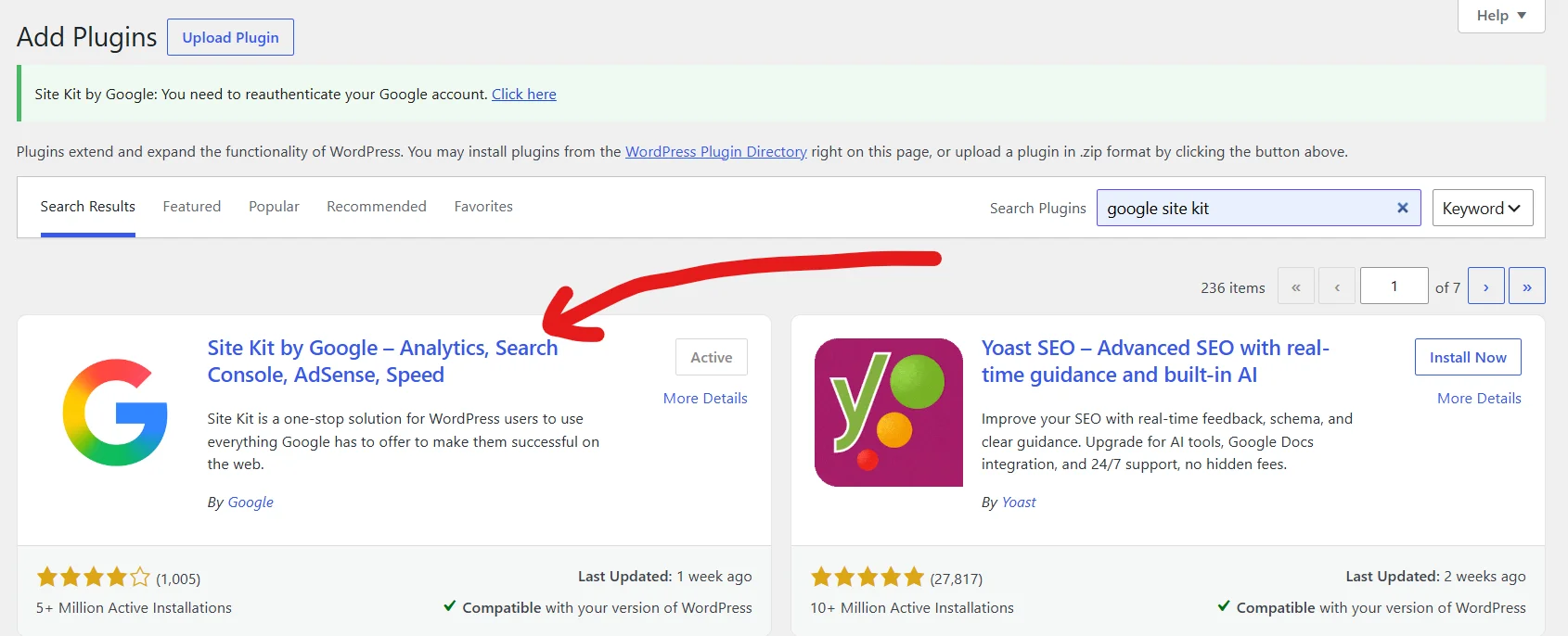
After install, it ask you to sign in with google account, choose your google account and click continue. If you have already in google search console website but not in analytics make sure use that google account when sign in, it auto detects.
Is Your Website WWW or non-WWW?
Your website can use either www or non-www. For example:
<span data--h-bstatus="0OBSERVED">https://www.example.com</span>
or<span data--h-bstatus="0OBSERVED">https://example.com</span>
Neither one is better. What matters is choosing one version and using it everywhere.
Make sure the other version redirects to your chosen one. Also use the same version in your WordPress settings, internal links, sitemap, and canonical tags.
after choosing one, in WordPress here in setting you put and that’s it.
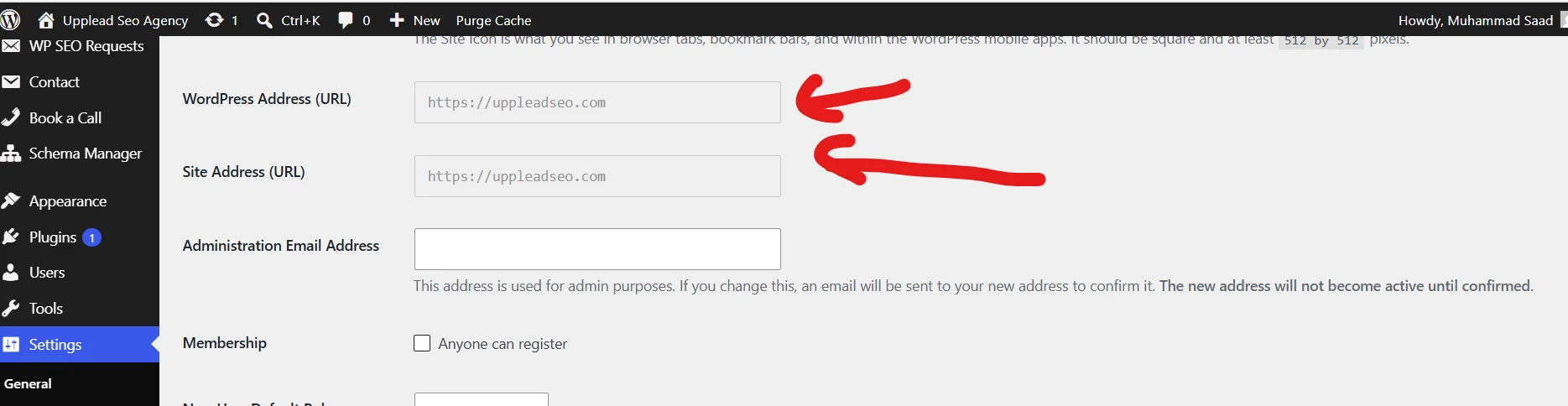
This helps Google understand which version of your website is the main one and prevents both versions from being treated as separate pages.
Set Up an SSL Certificate
If you purchase shared hosting, in cPanel you install certificate. if you have vps then. SSL(Secure Sockets Layer) Certificate activate https on your website.
Have You Optimized Your Robots.txt File?
Robots.txt is file of instructions for crawlers that you put in your root folder to block crawler’s from specific pages. For example:
User-agent: *
Disallow: /admin/
Disallow: /private/
Allow: /private/public-page.html
Sitemap: https://example.com/sitemap.xml
Are Your WordPress URLs SEO-friendly?
As in internal linking article, I said that WordPress urls seo friendly means: Try to use shorter urls, don’t repeat same words in urls, I not say that put primary keyword in url, please, google algorithms beyond these things.
Is Your Website Secure?
Website secure means two things. One is, website is HTTPs protocol and have proper certificate. second things is, you have strong password of your admin, you have to disable right click on your website.
Have You Generated and Optimized An XML Sitemap?
Sitemap is for crawlers and sometimes for humans a Map for your website. Like google maps. It locate properly all your pages on your website. Crawlers crawl them and sometimes human also locate them.
How to create?
For wordpress users, simply download any sitemap plugin, or if you already install yoast seo or rank math, those auto generate sitemaps.
Avoid 404 Errors By Implementing Effective Redirects
The page that no longer a page. or broken url or internal link 404, create 301 redirect on homepage. That’s helps for crawlers and humans to navigate to the right path.
Scheduling Redirects
You can scheduling redirects using cron jobs. It checks all your URLs on the webpage or crawl your website see auto any page return 404. and create auto redirects. But for this, you need for WordPress developer. They build custom plugin according to your hosting and WordPress website and implement this. That’s also called automate redirects. Because I am also WordPress developer. So we have a lot of more options to automate these things with Ai.
Optimize Your Website Experience
Your Ui for user is very easier and good looking. Navigations, CTAs, Buttons all well and properly structured. for example, you have local business, and your business is restaurant. So according to, Peoples must see your menu. In hero or header give button to show our menu.
Improve Your WordPress Website Speed
Use WordPress seo caching plugins like WP-Rocket. Use redis cache with wordpress. Check on google page speed insight your wordpress website. See Core Web Vitals. Use very less plugins. Light weight theme like astra.
Structure Your Site to Establish Hierarchy
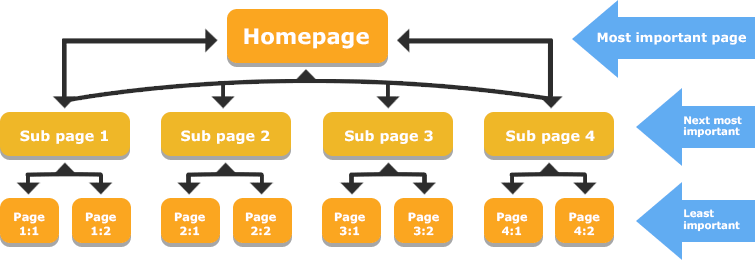
Before working as an seo on wordpress website, define and design all your internal linking or site structure How it’s like. Make sure it logical, relevant and contextual.
Mobile Optimization
Mobile optimization in wordpress website is very important. Mobile responsive layout and fast mobile loading are very important.
Use theme which is mobile responsive. Ask developer strictly optimize website for mobile. When you developed your website. The fonts, tables, ui, etc.
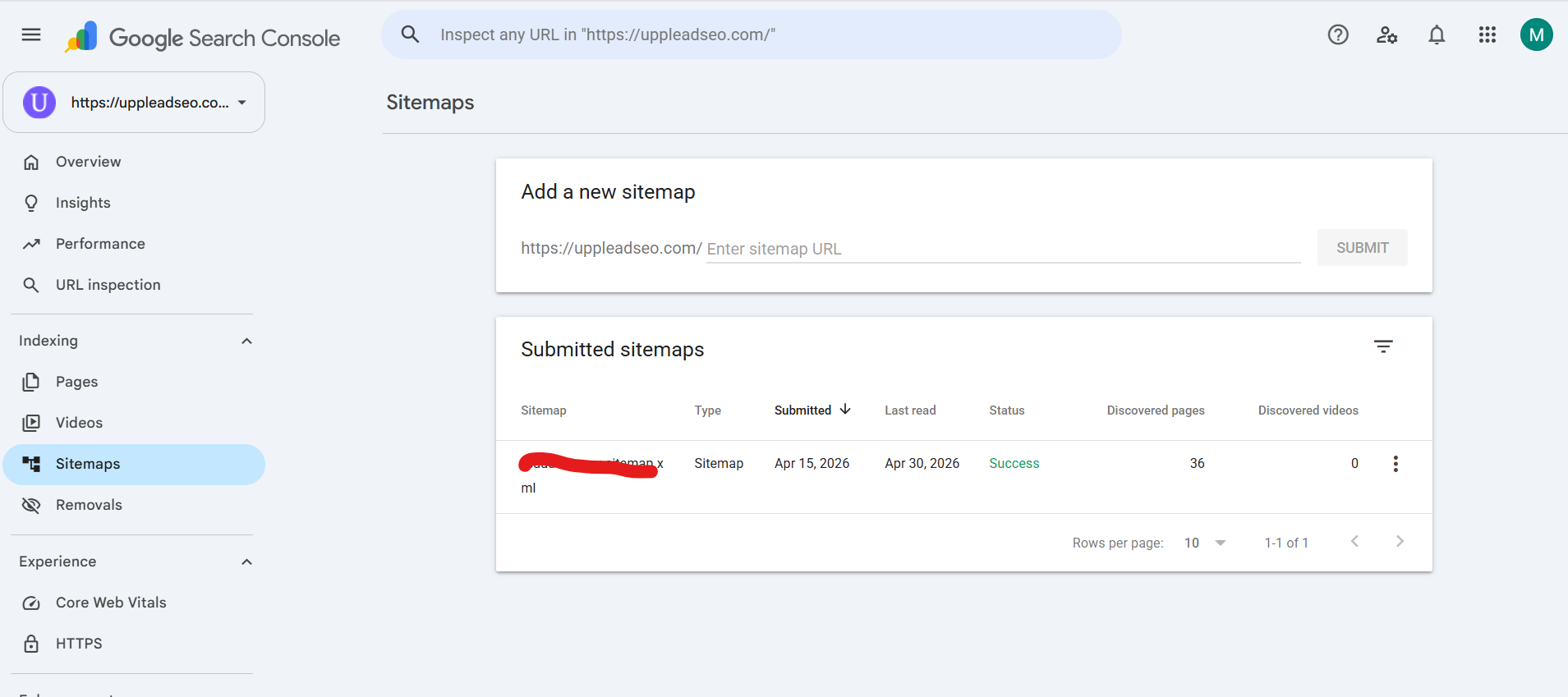
Submit Your Sitemap to Google Search Console
When you create your sitemap submit it in google search console. So, it knows on which url path we have sitemap.
Noindex Insignificant Pages
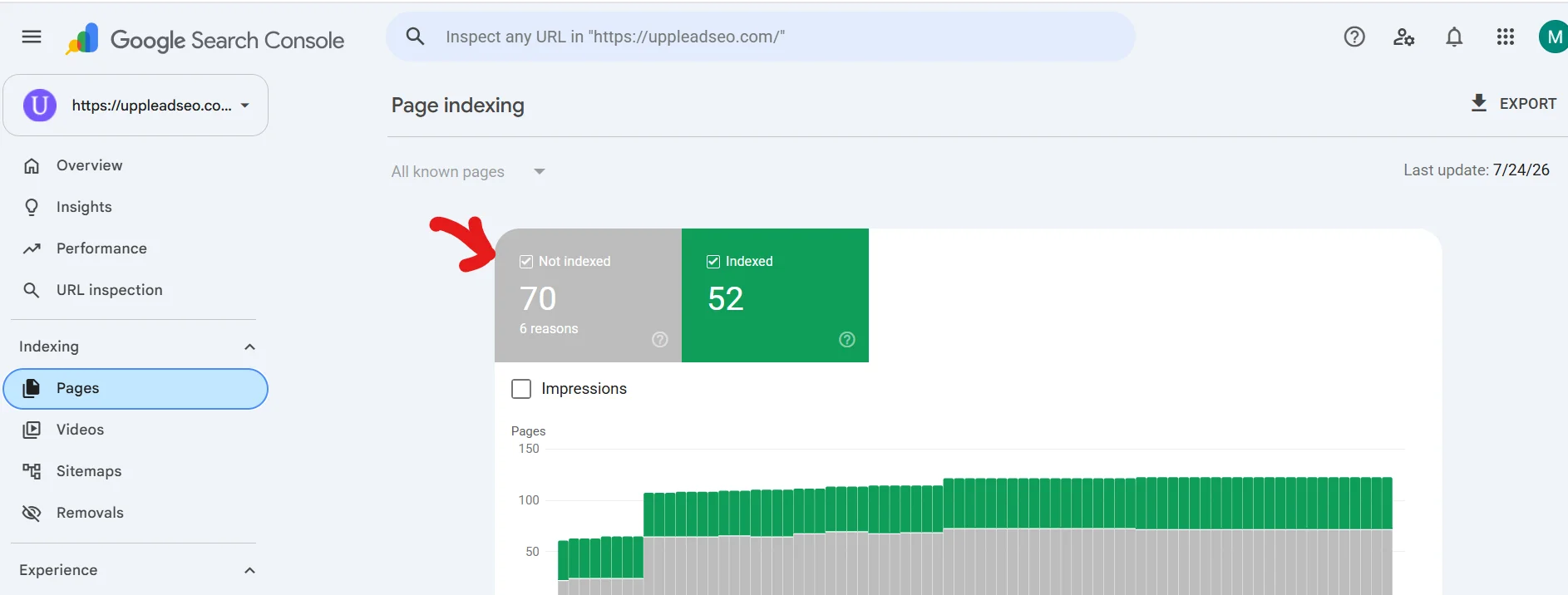
No index pages are pages that google search console not saved that pages in their database. when pages are not index it means it will not served and when not served no rankings at all. So, if your important pages are indexed. Make sure to index them.
Build topical map
On wordpress website when you start your seo, first create topical map. How your website blog are written and how your website have in visualization fist show. On YouTube, I record a lot videos on topical map you can search on YouTube “saad semantic seo”.
On-Page Optimizations: Take Advantage of Metadata
On-page optimizations metadata in wordpress website include title tags, and meta description. You enhance both and use relevant contextual words. For meta description, its not ranking factor, but telling google crawler our website i about this thing. you can use synonyms in meta description of what in your title.
Optimize your images and media
In your wordpress website for as an seo tip, use images.webp extension that have very compressed version of image with high quality. and your videos try to upload on YouTube and embed here.
Ensure Unique Content Across All Pages
Avoid duplicate content. That’s very bad affect on rankings of webpages and overall authority of the website. if you somewhere talk about same thing, use different tone and use synonyms of words.
Avoid Spam Through Manual Comment Approvals
Most of the peoples for the sake for backlinks comment on your wordpress website. Firstly integrate captcha on comments. secondly don’t approve spammy comments. Built in wordpress give option to send comment’s in spam.
Connect your content with contextual internal linking
Your articles and website pages of wordpress website have very contextual, relevant internal linking. For example, you have article on cat. It will internal link with animals or dogs. Animals is parent, hyponym of cat and dog is antonym of cat. That’s are lexical relations basically. But you don’t totally rely on lexical relations, See on google search queries first.
Internal and External Link Building Strategies for WordPress SEO
Internal and external link building are both essential for improving WordPress SEO. Internal links connect related pages and blog posts within the same website, helping search engines understand site structure while guiding visitors toward useful content.
They can also distribute authority across important pages, improve navigation, and increase the time users spend on the website. External link building focuses on earning backlinks from trustworthy and relevant websites.
These backlinks act as signals of credibility and can improve search rankings, referral traffic, and brand visibility.
Effective external strategies include guest posting, creating valuable shareable content, building relationships with industry websites, and replacing broken links with relevant resources.
For the best results, WordPress site owners should use descriptive anchor text, link only to relevant pages, avoid excessive or unnatural linking, and regularly check for broken links.
Optimize Indexing Protocols
Optimizing indexing protocols helps search engines discover, understand, and include important WordPress pages in search results more efficiently.
Simplify Your Top-Level Menu
In other article, i said that mega menu dilute page rank. That’s cause ranking effect of wordpress website. Try to use less urls in header. Use dynamic menu’s like on blog page another menu, on homepage another menu.
Avoid Orphan Pages:
The pages who not have internal links or any link goes to that page, But that page exist in your website. Fix those, using any auditor first identify which pages are orphan. Then internal link them.
Use Post Categories Correctly
Categories are one of the areas people either ignore completely (leaving everything in “Uncategorized”) or overuse (creating a new category for every post). Here’s how to get it right.
Understand what categories are actually for. Categories are the broad, hierarchical structure of your site — think of them as a book’s table of contents, broad topic groups like Recipes, Reviews, or Cooking Tips on a food blog. Tags are the opposite: specific descriptors, more like a book’s index — a single Recipes post might be tagged “pasta” or “30-minute meals.” The most common mistake is treating the two as interchangeable.
One primary category per post. Every post should belong to exactly one primary category — assigning multiple categories to a single post splits its topical signal across two archive pages instead of consolidating it. If a post genuinely straddles two topics, that’s what tags are for.
Keep the category count small and broad. Estimates vary slightly by source, but the consensus lands around 8-12 broad topics to 5-15 categories, kept hierarchical. If a category only has one or two posts sitting in it, merge it into a broader one rather than leaving thin, single-post categories around. When an existing category grows too broad, that’s the point to introduce subcategories rather than more top-level ones.
Never leave posts in “Uncategorized.” The default “Uncategorized” category should be renamed to something relevant to your niche — leaving posts there signals neglect to both users and search engines. Do this once under Settings → Writing so new posts default to a real category automatically.
Give category pages real content, not just post lists. WordPress auto-generates an archive page for every category, and by default it’s just a list of excerpts — which can read as thin or duplicate content. Adding unique descriptive content to that archive page turns it from a thin listing into an actual landing page, and most SEO plugins let you write a category description that displays above the post list and doubles as the page’s meta description.
Watch for duplicate-content side effects. A single post assigned to a category and tagged three different ways can end up showing on four separate archive pages with the same content, and paginated category archives (page 2, page 3…) commonly trigger duplicate meta-tag warnings in Search Console since the title/description doesn’t change across pages. If your category structure has ballooned into dozens of thin archives, the fix is usually to noindex the low-value ones via your SEO plugin rather than delete them — that consolidates link equity toward your actual posts without breaking existing URLs.
Be careful changing categories later. If your permalink structure includes the category slug (e.g. /category-name/post-title/), renaming or restructuring categories means you need 301 redirects from the old URLs and updated internal links — otherwise you’re creating broken paths across the site you just spent time cleaning up.
Optimize Category Pages
Add text, FAQ, and relevant content under the category page. So, it will also rank in google search queries.
Enable Breadcrumbs
Breadcrumbs helps to logically navigate the folders in your website. it in start increase the links that dilute page rank, but worth it to use if you have proper sequences of folders. Like seo – onpage – factors.
Use a CDN
Use CDN. I recommend for cloudflare. For WordPress site, a lot of people send scanning or automated traffic to crack your wordpress password. So, when you create security rules in cloudflare all traffic blocked before reaching to server that leads to low load on server.
CDN also make cache and fast the speed of the page. It create copy of your website and shown to visitor or crawler even your hosting still loading resources.
Mark Up Your Pages with Schema
In WordPress, we have a lot of separate plugins for schema. But yoast seo and rank math auto create schema. if you don’t install those you go for separate plugin.
Update Regularly
Update your plugins and theme regularly. If any bug in previous versions, hackers attach and steal access of your wordpress backend.
Check your site health
WordPress built in function that shows website health. It’s worth it to check monthly to see.
Check you’re using suitable hosting
Now a lot of provider give separate wordpress hosting. So, you can purchase if you have only wordpress site. I run my website on share hosting near 1-2 year. I have very bad experience. If you want fast speed website, you need to purchase VPS from ovh cloud. that’s very cheap and best.
Upgrade to a recent version of PHP
WordPress run in php. So, for upgrading regularly when update appears of php is important.
Optimize your individual posts and pages:
Optimize every word that written on your page and posts. Every word give meaning, and connected with your website goal and create the word relationship in each other that’s you can say relevance, or high quality content.
Keyword cannibalization
Cannibalization is when two pages rank on same keyword. Must care about it and fix it, if content is mixing in both pages solve it.
Pagination
In wordpress we have a lot of pagination pages like for category for authors. So firstly avoid from pagination! if have use canonical tags. if you are developer or have developer ask them to use ajax and no url generation. that’s how pagination works but not create bunch of urls.
Is WordPress Good for SEO?
WordPress stack in industry is good for seo. Because it give some built in features for seo tasks.
Hire Us For WordPress SEO Services
Uppleadseo provides best wordpress seo. i worked with a lot of wordpress seo website & We provide best services. See more details: WordPress SEO Services.