


 Muhammad Saad
 Summarize in ChatGPT
Googlebot is the crawler system Google Search uses to discover, fetch, render, and refresh public web content. Google currently describes two main Search crawler types—Googlebot Smartphone and Googlebot Desktop—and states that most sites now receive a majority of crawl requests from the smartphone crawler because Google indexes the mobile version first. Googlebot easily tracked which helps for your seo strategy. You see most crawled pages and optimize to gain the trust of google search that’s exactly increase your rankings. The admin pages of website doesn’t needed to be crawled or visit by anyone so you can stop google bot by three methods, 1 – robots.txt, 2- you add noindextag, 3- you give 403(Make your content private), 503, etc, to google by using server level configuration in ngix or apache what ever your server is.
What Is Googlebot?
Googlebot is the generic Google Search crawler family that discovers URLs, downloads resources, and passes content into Google’s indexing systems. Google defines two main Search crawler types—Googlebot Smartphone and Googlebot Desktop—and both use the same Googlebot robots.txt token, so a site cannot target the smartphone and desktop versions separately with robots.txt rules.
Googlebot is not a single server or a single IP. Google’s crawler infrastructure runs on many machines across many datacenters, which is why logs often show multiple source IPs for the same site. For most sites, Google Search uses the mobile version of the page for indexing and ranking, so the smartphone crawler usually dominates the crawl mix.
How to Monitor Googlebot’s Activity?
To monitor Googlebot’s activity, use server logs for exact crawl hits, Crawl Stats for sitewide trends, URL Inspection for page-level diagnosis, and sitemap or robots diagnostics for discovery and access checks.
Client-side analytics are weak for bot monitoring. Google states that client-side analytics may not provide a full or accurate representation of Googlebot and Web Rendering Service activity, so Crawl Stats and logs are stronger sources of truth. Google also states that Search Console does not provide crawl history filtered by URL or path, which is why raw logs matter for path-level auditing.
Google’s own documentation treats these tools as complementary, not interchangeable.
The table below shows the strongest monitoring signal from each method.
| Method | Strongest signal | Main use |
|---|---|---|
| Server logs | Exact URL hits, status codes, IPs, timestamps | Confirm real crawl frequency and verify source |
| Crawl Stats report | Requests over time, server responses, availability issues | Detect sitewide crawl problems |
| URL Inspection | Index state, robots state, last crawl, loaded resources | Debug one page at a time |
| Sitemap reporting | Sitemap access time and processing errors | Check discovery hints |
| robots diagnostics | robots refresh and blocking rules | Validate crawl access control |
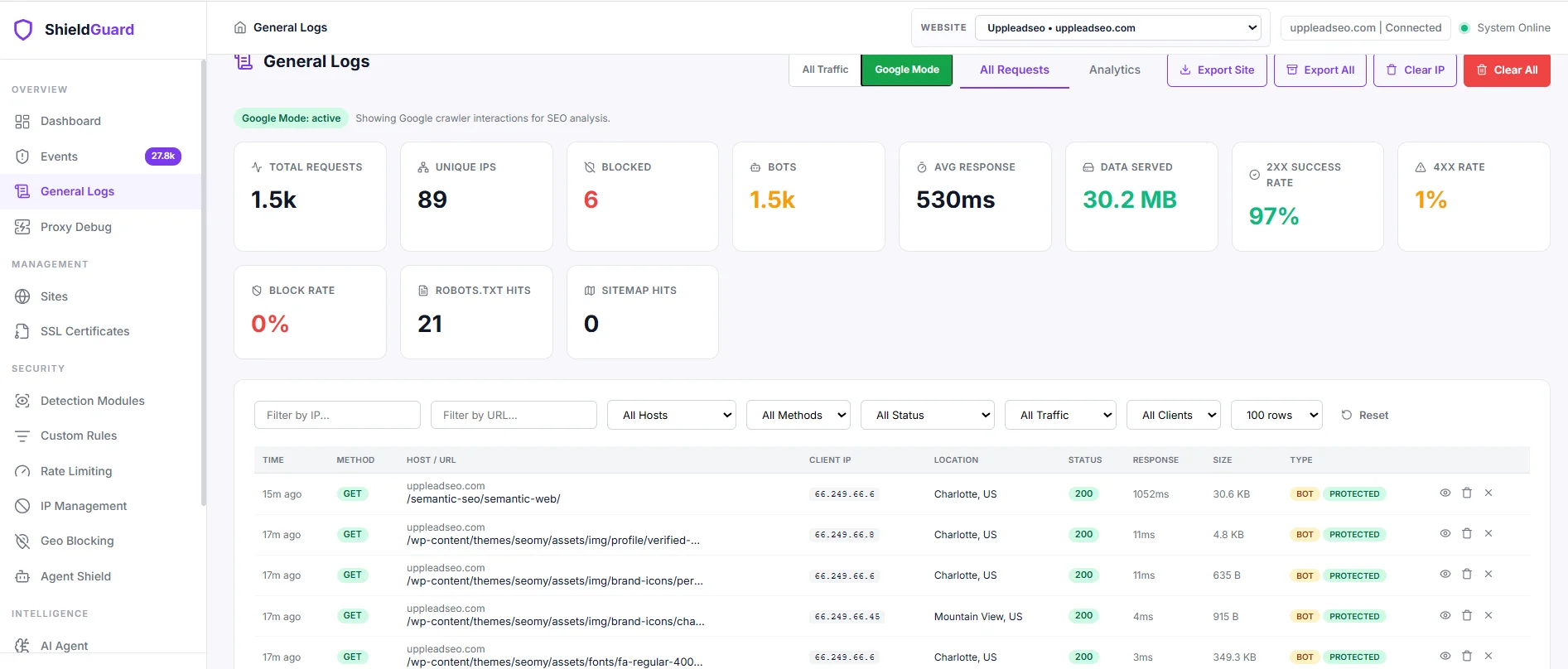
See the server logs example from which personally I use:
How Googlebot Crawls and Indexes the Web?
Google Search describes the process as crawling, indexing, and serving, but for site owners the practical pipeline is discovery, fetching, rendering, and indexing. Googlebot first finds URLs, then requests content, then renders JavaScript where needed, then passes the resulting content and metadata into Google’s indexing systems for evaluation.
- Discover URLs. Googlebot finds new pages mainly through links from already known pages and through submitted sitemaps.
- Fetch content. Googlebot uses an algorithmic process to decide which sites to crawl, how often, and how many pages to fetch, while trying not to overload the server. Repeated
500-class problems slow crawling. - Render pages. Google renders JavaScript with a recent version of Chrome. If important content depends on blocked or broken resources, Google may not see that content correctly.
- Evaluate for indexing. After crawling, Google analyzes text, media, titles, alt attributes, and other signals. A
2xxstatus lets content enter processing, but a2xxresponse does not guarantee indexing.
Not every discovered page gets crawled quickly, and not every crawled page gets indexed. Google states that pages can be skipped because of crawl restrictions, login requirements, low demand, or low value, and its crawl budget documentation explains that Google crawls what it both can crawl and wants to crawl.
How to Control Googlebot?
To control Googlebot, separate crawling control, indexing control, and access control. Google’s documentation consistently distinguishes these three jobs because each one uses a different mechanism and produces a different outcome.
The matrix below shows the cleanest control pattern for each goal.
| Goal | Best mechanism | Result | Common error |
|---|---|---|---|
| Stop fetching a URL pattern | robots.txt |
Compliant crawlers do not fetch matched URLs | Expecting instant deindexing |
| Remove a page from Google Search | noindex meta or X-Robots-Tag: noindex |
Google can drop the page after recrawl | Blocking the page in robots.txt first |
| Make content private | Authentication or other access control | Users and crawlers cannot access it | Treating robots.txt as security |
| Slow Google in an outage | Temporary 500, 503, 403 or 429 |
Crawl rate drops at host level | Keeping error throttling active for many days |
Ways to Control Crawling
To control crawling, use robots.txt for access patterns, cleaner URL inventory for efficiency, and short-term server responses for emergencies. Google’s crawl budget guidance ties wasted crawl time directly to duplicate, infinite, or low-value URL spaces.
- Block faceted navigation, internal search results, calendars, and low-value filter URLs in
robots.txtwhen those URLs waste crawl time. - Place
robots.txtin the top-level directory only; the rules apply to the exact host, protocol, and port where that file is hosted. - Return
500,503, or429for 1–2 days to force an emergency crawl slowdown; Google states that401and403do not reduce crawl rate. - Ignore
crawl-delayas a Googlebot control idea; Google does not support it in robots.txt.
Ways to Control Indexing
To control indexing, allow Googlebot to reach the page and then use noindex or X-Robots-Tag. Google states plainly that noindex works only when the page is accessible to the crawler and is not blocked by robots.txt.
- Use
<meta name="robots" content="noindex">for HTML pages you want removed from Search. - Use
X-Robots-Tag: noindexfor non-HTML files such as PDFs, images, or video files. - Keep the page crawlable until Google sees the rule; a robots.txt block prevents Googlebot from reading the
noindex. - Avoid placing
noindexinside robots.txt; Google does not support that syntax.
How to Block Googlebot?
To block Googlebot, choose the exact outcome first. Use robots.txt to stop crawling, use noindex to stop search appearance, and use authentication or other hard access control to stop both users and crawlers. Google also warns that blocking crawling does not keep a URL secret or guarantee that the URL disappears from search results.
Google’s own blocking guide is simple:
- Prevent crawling: use
robots.txt. - Prevent indexing: use
noindexand let Googlebot access the URL. - Prevent all access: use password protection or another hard access barrier.
Google also notes that keeping a URL “secret” is difficult. Referrer logs, public links, and third-party publishing can expose private-looking URLs, which is why robots.txt is a traffic-management tool, not a confidentiality tool.
What are the Technical Details of Googlebot?
The Technical Details of Googlebot that I explain are location behavior, file limits, protocol support, compression support, and cache semantics. These details matter because they shape how Googlebot reaches the page and what bytes it actually processes.
Location
Google’s crawler infrastructure is globally distributed but primarily US-egressed. Google states that crawler traffic comes from many datacenters around the world, that egress is primarily from IP addresses in the United States, and that Google may crawl from other countries when US-based requests are blocked. Google also states that when Googlebot crawls from US IPs, its timezone is Pacific Time.
This location behavior matters on locale-adaptive sites. Google says the default Googlebot IPs appear US-based and that Googlebot sends requests without an Accept-Language header, so a site that serves content only by IP or language inference can hide regional versions from crawling. Google recommends separate locale URLs with hreflang instead.
Max File Size
Read together, Google’s crawler docs show a two-layer file-limit model. The general crawling infrastructure defaults to the first 15 MB of a file, while Googlebot for Search currently fetches the first 2 MB of supported file types and the first 64 MB of a PDF. Google also states that the limit applies to uncompressed data and that referenced resources are fetched separately.
This means page weight still matters even when compression is enabled. Large HTML, oversized inline data, and heavy render-critical resources can reduce the amount of content Googlebot processes efficiently.
Supported Transfer Protocols
Google’s crawlers support HTTP/1.1 and HTTP/2 as core web protocols, and Google also documents rare crawling through FTP and FTPS. Google states that the default protocol version is HTTP/1.1, that the crawlers can switch protocols between sessions, and that HTTP/2 can save CPU and RAM but does not create a Google Search ranking boost.
Content Encoding (Compression)
Google’s crawlers support gzip, deflate, and Brotli (br). Google states that the supported encodings are advertised in the Accept-Encoding request header, which means a properly configured server can return compressed responses that save bandwidth and reduce transfer cost.
HTTP Caching
Google’s crawler infrastructure supports heuristic HTTP caching with ETag, If-None-Match, Last-Modified, and If-Modified-Since. Google recommends ETag over Last-Modified when both are present, states that other caching directives are not supported, and notes that Googlebot uses caching when re-crawling URLs for Search. A 304 Not Modified response tells Google the content is the same as the previous crawl.
How do I know it’s Really Googlebot?
To know it’s really google bot the user-agent string, the source IP, and the reverse DNS identity all line up with Google’s published crawler patterns. Google explicitly warns that the User-Agent header is often spoofed, so log analysis that trusts only the header is weak.
How Do You Verify Googlebot IPs?
Google’s verification method is reverse DNS first, then forward DNS, then IP-range confirmation. Google publishes the reverse DNS masks for common crawlers and also publishes crawler IP ranges in JSON files.
- Run a reverse DNS lookup on the source IP from your logs.
- Check that the hostname resolves to a Google-owned crawler pattern such as
googlebot.comorgeo.googlebot.comfor common crawlers. - Run a forward lookup on that hostname.
- Confirm that the forward lookup returns the same original IP, or match the IP against Google’s published crawler JSON ranges.
What Can I Do to Optimize My Site for Googlebot?
To optimize a site for Googlebot, improve discovery, accessibility, rendering, and efficiency. Google’s Search, crawling, JavaScript, and page-experience docs support a consistent checklist.
- Link important pages with crawlable
<a>links so Google can discover them reliably. - Submit XML sitemaps, keep them current, include canonical URLs, and add
lastmodwhere content changes frequently. - Consolidate duplicate URLs with canonicals and reduce wasteful URL spaces before crawl budget is spent on them.
- Match mobile and desktop content closely, because Google uses the mobile version for indexing and ranking.
- Leave essential CSS and JavaScript crawlable, then test rendered output with URL Inspection or Rich Results Test.
- Speed up page delivery and rendering, because faster pages let Google read more content without straining the host.
- Return the correct HTTP status codes:
200for live content,301/308for permanent moves, and404/410for removed URLs. - Use small banners instead of full-screen interstitials, and do not redirect every URL to a separate consent page.
Google’s sitemap guidance adds one more practical filter: on small sites of roughly 500 pages or fewer that are comprehensively linked, a sitemap is less critical. On large or rapidly changing sites, crawl-budget work becomes much more important.
What Are the Different Kinds of Googlebots?
Google Search currently uses two main Googlebot types plus several specialized Googlebot tokens for media and news handling. Google’s crawler documentation also distinguishes Googlebot-family crawlers from related Google crawlers such as AdsBot or Google-InspectionTool.
The table below summarizes the main Googlebot-family variants most site owners see.
| Googlebot type | Main role | Key detail |
|---|---|---|
| Googlebot Smartphone | Main mobile web crawler for Search | Usually sends the majority of crawl requests on most sites |
| Googlebot Desktop | Desktop web crawler for Search | Still used, but usually in the minority |
| Googlebot-Image | Image crawling | Affects Google Images, logos, favicons, and image features |
| Googlebot-Video | Video crawling | Affects video-related Search features |
| Googlebot-News | News crawling preference token | Has no separate HTTP request user-agent string |
Google also documents related non-Googlebot crawlers. AdsBot is a special-case crawler with product-specific permissions, and Google-InspectionTool affects testing tools such as URL Inspection and Rich Results Test, not Google Search ranking itself.
Does a robots.txt file really block Googlebot or other bots?
A robots.txt file really blocks compliant crawlers from fetching matched URLs, but it does not guarantee deindexing, secrecy, or obedience from rogue bots. Several low-level robots.txt facts matter in production. Google caches robots.txt for up to 24 hours, enforces a 500 KiB size limit, treats rules as host/protocol/port specific, and treats most 4xx errors on robots.txt—except 429—as if no valid robots.txt file exists. That means a broken robots.txt can accidentally reopen crawling instead of tightening it.
Robots.txt is mainly for managing crawler traffic and avoiding overload, not for keeping pages out of Google or hiding content from the public. Respectable crawlers obey robots.txt, while other crawlers may not.
The real answer depends on the bot class:
- Googlebot automatic common crawling: yes, Googlebot checks robots.txt before crawling and obeys REP for automatic crawling. A blocked URL can still appear in search as a URL-only result if Google learns about it from links.
- Some other Google requestors: not always. Google documents special-case crawlers and user-triggered fetchers that may ignore robots.txt by design, and Google-Safety ignores robots.txt for abuse-specific crawling.
- Other bots on the web: no guarantee. Duke University’s 2025 large-scale study found stricter robots.txt directives reduced compliance and some bot classes rarely checked robots.txt at all.